
Cypress and Playwright are the most popular test automation frameworks today. Many testers start learning how to write automated tests using them in their own projects. Since there are countless articles online covering the basics, I wouldn’t want to write another text explaining how to build a project using Playwright or Cypress from scratch.
Instead, I want to focus on one crucial architectural difference between them: how you extract and transform UI data.
Let’s imagine that we need to verify the lowest product price on our application. Our test should contain the following steps:
1. Visit the product listing.
2. Get all prices.
3. Transform the string prices into numbers.
4. Find the minimum value in the list.
5. Verify if the minimum value matches what we expected.
Let’s see what such a test looks like when written in Playwright and Cypress.
Approach 1: Playwright (Native JavaScript Promises)
test('lowest price is correct', async ({ page }) => {
  await page.goto('/products')

  const priceTexts = await page.locator('.price').allInnerTexts()
  // ["$9.99", "$4.99", "$14.99"]

  const prices = priceTexts.map(p => parseFloat(p.replace('$', '')))
  // [9.99, 4.99, 14.99]

  const min = Math.min(...prices)
  // 4.99

  expect(min).toBe(4.99)
})
At first glance, you can see that Playwright’s allInnerTexts() function returns a standard array of strings. Since it relies on async/await, once the promise resolves, you can work with the data using native JS array methods (like .map()) and Math functions. No magic, just plain JavaScript.
Approach 2: Cypress Standard Way (The Subject Queue)
Now, let’s look at the standard out-of-the-box implementation in Cypress:
it('lowest price is correct', () => {
  cy.visit('/products')

  cy.get('.price')
    .then(($els) => {
      const prices = Cypress._.map($els, el =>
      parseFloat(el.innerText.replace('$', '')))
      // [9.99, 4.99, 14.99]

      const min = Cypress._.min(prices)
      // 4.99

      expect(min).to.equal(4.99)
    })
})
In Cypress, cy.get() doesn’t return DOM elements directly – it returns a
Cypress Subject, which is essentially a command queue wrapper around a jQuery
object ($el). However, you can’t access that underlying element directly until you step into a .then() block. You can compare it to a closed box: you know you have the box, but you must open it if you want to interact with what’s inside. That is exactly what .then() is for. Inside that block, we typically use the bundled Lodash
library (Cypress._) to iterate over and manipulate the array of elements.
Approach 3: Cypress Fluent Way (Using cypress-map plugin)
While the second approach works well, using .then() breaks the fluid command chaining syntax that Cypress is famous for. To keep the test fully declarative without nesting callbacks, advanced Cypress users often turn to dedicated plugins like cypress-map.
Here is what the third approach looks like when using a plugin to transform data within a single, flat chain:
it('lowest price is correct', () => {
  cy.visit('/products')

  cy.get('.price')
    .map('innerText')
    .mapInvoke('replace', '$', '')
    .map(Number)
    .apply(Cypress._.min)
    .should('equal', 4.99)
})
How does this plugin-based chain work under the hood?
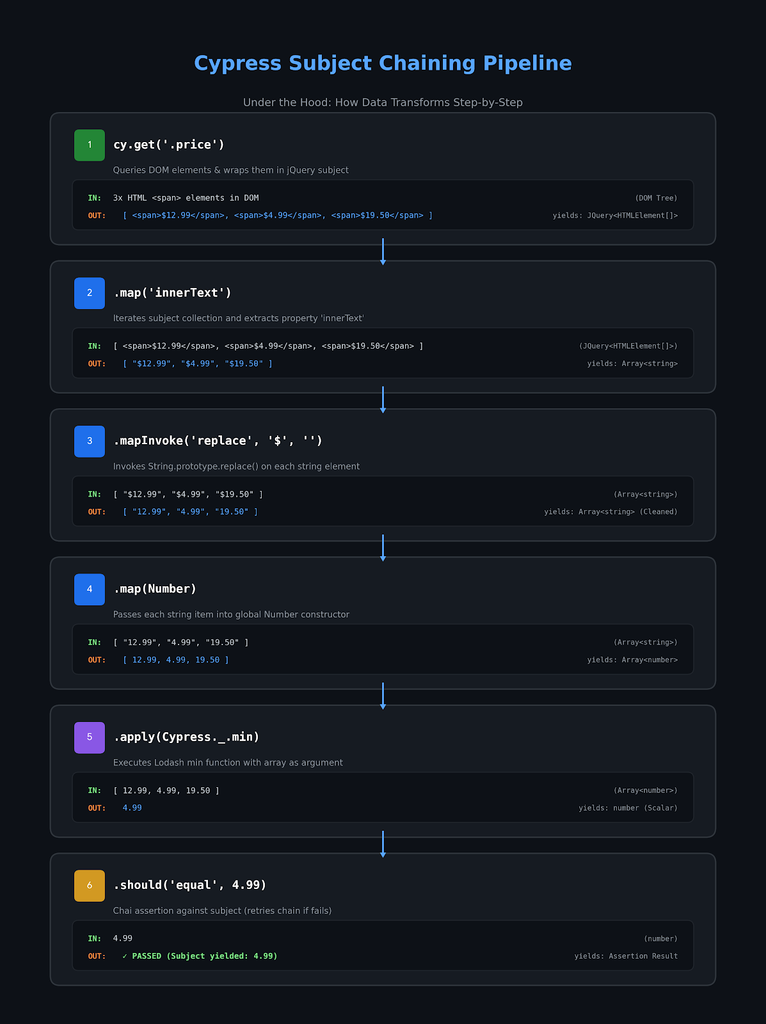
The biggest advantage of this third approach isn’t just aesthetic—it’s retry-ability. Because the plugin operations stay within the Cypress command chain, Cypress will automatically re-run the entire pipeline (from cy.get() down to .should()) if the DOM elements or data take a moment to settle, preventing flaky assertions.
Conclusion
When it comes to extracting and transforming UI data, both tools get the job done, but they take fundamentally different approaches:
Playwright feels like writing standard modern JavaScript. Once you resolve the locator’s data, you’re just working with native arrays and objects. It’s explicit, predictable, and transparent.
Cypress relies on a specialized ecosystem. Out of the box, it forces you to unpack subjects using .then(). However, with community plugins like cypress-map, you can build elegant, auto-retrying pipelines that stay true to the framework’s declarative design.